Guide · Last reviewed November 2026 · Educational only, not legal advice
Website Tracking Lawsuits and Consent: A Guide for Therapy Practice Owners
What these accusation letters are, what to do the day one arrives, and how to fix your website so it doesn't invite one.
This fall, a therapy practice owner forwarded me an email that made my stomach drop. It accused their website of breaking a federal wiretap law, came with a deadline about a week out, and offered to make it all go away for a payment. They weren't alone.
I'm not a lawyer. I'm the person who builds and maintains websites and intake systems for therapy practices, so I dug in. This guide is what I learned, written for practice owners and the people who run their websites.
 Brent Stutzman, Founder & CEO
Section 01 — Quick Answers
Therapy Website Lawsuits: Quick Answers
- Is this a lawsuit?
- Usually not yet. Most start as an accusation letter (a "demand letter"), often by email, with a short deadline and a settlement offer. It can become a lawsuit if it isn't resolved, so don't ignore it.
- Should I pay to make it go away?
- Not before a licensed attorney has reviewed it. Verify who sent it using a source you look up yourself, not the links or phone number in the email.
- Does a cookie banner fix it?
- Only if tracking actually waits for a yes, and Reject is as easy as Accept. A banner that appears after Google Analytics or the Meta Pixel already loaded doesn't help much.
- Is Google Analytics illegal on a therapy website?
- Not by itself. The risk comes from loading it before consent.
- What do I do today?
- Don't click the link or enter the code. Call an attorney and your insurance carrier. Save the email and your site settings. Then scan your site and fix anything that fires before a visitor says yes.
Section 02 Watch the Webinar
On November 4, 2026, Jamey Davidson, a partner at O'Hagan Meyer who works on data breach, privacy and cyber liability matters, joined me for a live webinar on this topic. The replay will be posted here so you can hear his perspective directly.
Webinar replay
Coming soon
The recording will appear here after the live session.
Section 03 — What's Happening, in Plain English
Why Therapy Websites Are Getting Wiretap Lawsuit Letters
Think of your website as a store with security cameras. Tracking tools like Google Analytics, Google Tag Manager and the Meta (Facebook) Pixel are cameras that report to outside companies: who walked in, what they looked at, sometimes what they typed.
A federal law from 1986, the Wiretap Act, says you can't secretly intercept someone's private communication. Some people now argue those website tools "listened in" on visitors without clear permission. Courts disagree about whether that's true, and nobody has settled it yet.
Section 04 — What an Accusation Letter Looks Like
What a CIPA Demand Letter Looks Like
These usually start as a letter or email, not a court case. The formal name is a demand letter. I call them accusation letters, because that's what they are: someone says your website broke a law and offers to make it go away if you pay. It is not a lawsuit. But it deserves a real response.
Some of the services sending them work like a one-stop shop: they scan your site, accuse, deliver an evidence package, and collect the money.
- 1A robot visitsSoftware visits your website and logs which trackers fire, and when.
- 2An evidence packageIt packages screenshots, network logs and file fingerprints so the record can't be called altered.
- 3The accusationAn email arrives, often from a platform, naming a person as the "claimant" and citing a wiretap law.
- 4The collectionA portal, an access code, a deadline and a settlement path: sign a release and pay.
Five things to notice
- 1.The sender is a platform, not a law firm.
- 2.A named individual is listed as the claimant.
- 3.The deadlines are short, often about a week.
- 4.There's a portal with a unique access code.
- 5.Settlement means a signed release and a payment, often by bank transfer.
Section 05 — What Raises or Lowers the Risk
What Raises or Lowers Your Website Lawsuit Risk
Every letter is different, and none of this is a guarantee either way. But the same patterns come up again and again.
Raises the risk
- Tracking that loads before a visitor says yes
- Page titles or web addresses that name a condition (for example, "Depression Treatment")
- Advertising features turned on in Google Analytics
- Tracking on intake, contact or booking pages
- A privacy policy that doesn't match what the site actually does
- The Meta (Facebook) Pixel or session-recording tools
Helps, but never a guarantee
- The sender was never a client
- Only basic analytics (page views) ran
- Only public pages, like services and blog posts, were tracked
- Nothing typed into forms was sent anywhere
Section 06 — What the Courts Are Saying
Meta Pixel and Website Tracking Lawsuits: What Courts Are Saying
Here's the honest picture: courts don't agree. Some let these cases move forward, and some throw them out. A few rulings are worth knowing by name. None of them means a letter you receive is right or wrong. That's a question for your attorney.
- American Hospital Association v. BecerraN.D. Texas, June 20, 2024
- Struck down the part of HHS's tracking guidance that said an IP address plus a visit to a public health web page automatically counts as protected health information. HHS dropped its appeal in August 2024. It removed one rule, not the whole problem.
- Read the rulingRead the AHA's briefHHS drops its appeal
- Rand v. Eyemart ExpressU.S. Court of Appeals, Fifth Circuit, October 23, 2026
- Revived a Meta Pixel case. The court said browsing and appointment scheduling on a health-related site can plausibly be individually identifiable health information, and distinguished Becerra. If scheduling an eye exam can count, a therapy consult is an easy comparison.
- Read the rulingLaw firm summary
- Strong v. LifeStance Health GroupD. Arizona, January 27, 2025
- A large mental health provider with the Meta Pixel on its website. The court let the federal Wiretap Act and most other claims move forward. That is a ruling that the case can continue, not a finding that the provider broke the law.
- Read the ruling
- Courts are split (the "crime-tort" question)Federal courts, 2025 to 2026
- In one federal district alone (Massachusetts), judges allowed 4 of these claims and dismissed 6 between June 2025 and September 2026. An appeal on the key question, Goulart v. Cape Cod Healthcare, is pending at the First Circuit.
- Read the roundupRead the U.S. Chamber's brief in Goulart
- Javier v. Assurance IQU.S. Court of Appeals, Ninth Circuit, May 31, 2022 (unpublished)
- Under California's wiretap law, consent has to come before the tracking starts. Agreeing to a policy afterward wasn't enough. This is why tracking should wait for a yes.
- Read the rulingLaw firm summary
- Popa v. MicrosoftU.S. Court of Appeals, Ninth Circuit, August 26, 2025
- A shopper on a pet supply site couldn't sue over session recording because nothing sensitive was shared. The court pointed to sensitive medical information as different, which is exactly what a therapy website handles.
- Read the ruling
- Doe v. Adventist Health System/WestCalifornia Court of Appeal, August 24, 2026
- Allowed parts of a case about the Meta Pixel and Google Analytics on a health site's forms to proceed as a class action. It's a class certification ruling, not a finding of liability, and it names Google Analytics.
- Read the ruling
- California SB 690Signed September 30, 2026; effective January 1, 2027
- Ends private "pen register" website claims under California's privacy law. It does not remove California wiretap claims, and it doesn't touch the federal Wiretap Act, which many of these letters cite.
- Read the signing messageRead the billLaw firm summary
Section 07 — Your First 24 Hours
What to Do If You Get a Website Tracking Lawsuit Letter
If an accusation letter lands in your inbox, do these in order.
- 1Breathe. Don't click links, scan a QR code, or enter the access code.
- 2Verify the sender yourself, using a source you looked up. The phone number in the email isn't an independent check.
- 3Call a licensed attorney today.
- 4Tell your insurance carrier today. Late notice can affect coverage.
- 5Save everything: the email, any PDF, the email headers, and your website settings as they are now.
- 6Don't delete Google Analytics, Tag Manager or plugins until your attorney says it's okay. Preserve first, then fix.
- 7Don't pay or sign anything until an attorney has reviewed it.
Section 08 — Scan Your Own Site
How to Scan Your Therapy Website for Tracking
See it first. This copy-and-paste prompt gives you a plain-English first look.
- Click "Copy prompt" below.
- Open Claude (or another AI tool) with web browsing turned on. A tool that can open a real browser, like Claude in Chrome, gives the best results because it can watch your site load.
- Paste the prompt, replace [YOUR WEBSITE ADDRESS] with your site, and send it.
- Read the report, then take it to your webmaster. If you've already received a letter, give it to your attorney before changing anything.
Website privacy scan prompt
I'd like your help reviewing my therapy practice's website for privacy and tracking risks. I am not asking for legal advice. Please be plain, specific, and honest about anything you could not check.

My website: [YOUR WEBSITE ADDRESS]

Please review these pages: the homepage, the contact page, any appointment or booking page, and one service page (for example, an anxiety or couples counseling page). If you can use a real browser, open each page fresh, as a first-time visitor, and do not click anything on the cookie banner yet.

1. Outside companies. Before I accept anything, list every outside company each page sends data to. Look for Google Analytics, Google Tag Manager, Google Ads, the Meta (Facebook) Pixel, Microsoft Clarity or Bing ads, Hotjar or other session recording, TikTok, LinkedIn, chat widgets, form or scheduling tools, YouTube, Vimeo, and Google Maps.
2. Cookie banner. Is there one? Is "Reject" as easy to find and click as "Accept"? If I reject, do the trackers stay off?
3. Forms and booking. Do the contact, intake, or booking forms load from an outside company? Does anything appear to send what someone types, or form activity, to an analytics or advertising tool?
4. Page titles and web addresses. On pages where tracking runs, do the page titles or web addresses name a condition or service (for example, "Depression Treatment")?
5. Session recording. Is any tool recording mouse movement, clicks, or keystrokes?
6. Privacy policy. Find my privacy policy. Does it name the tools you found? Does it promise anything the site doesn't actually do?

Then give me:
- A table with the columns: Tool | Page | Loads before consent? (Yes / No / Couldn't tell) | Notes
- A "Fix first" list of the top 5 issues, in plain English, ranked from highest to lowest risk
- A short, friendly note I can forward to my webmaster
- A list of anything you could not verify, and how my webmaster can check it (for example, the browser's Network tab or Google Tag Assistant)

Do not guess. If you can only read the page's code and cannot watch it load in a browser, say so at the top of your answer.
Section 09 — Fixing a WordPress Site
WordPress Cookie Consent: Fixing Your Therapy Website
Where tracking hides
- Theme header or footer code
- Plugins (analytics plugins, Meta Pixel plugins, chat plugins)
- Page builders
- Google Tag Manager
- Old code from a past marketer
A consent plugin: Complianz
On WordPress, a consent plugin is usually the starting point. One option is Complianz, which has a free version and a paid version. According to its plugin and pricing pages, the free version includes a cookie banner, a limited cookie scan, script blocking, basic proof of consent and a cookie policy. The paid version adds records of consent, Google Consent Mode v2, Global Privacy Control support, region-based banners and a full-site scan.
This is a reference, not an endorsement, and features change, so check them in the plugin itself. A banner plugin doesn't fix tracking by itself. After you set it up, re-scan to confirm nothing fires before a visitor says yes.
The fix list
- 1.Back up the site. Export your Tag Manager container and note your Google Analytics settings. (If a letter has arrived, ask your attorney first.)
- 2.Inventory every tag and plugin that sends data out.
- 3.Remove what you don't use, starting with the Meta Pixel and any other old pixels.
- 4.Make the consent banner block tracking until a visitor says yes, with Reject as easy as Accept.
- 5.Check three Google settings that sound alike (next section).
- 6.Make sure forms don't send what people type to outside tools.
- 7.Check page titles and web addresses on sensitive pages.
- 8.Update the privacy policy to match what the site actually does.
Section 10 — Three Google Settings That Sound Alike
Google Analytics and HIPAA: 3 Settings That Sound Alike
Google gave three different features nearly the same name. Only two of them grab what people type into your forms.
Google Analytics
Enhanced measurement
- Counts what visitors do: scrolls, clicks, video plays, downloads, site searches, form starts
- Doesn't read what someone types into your contact form
- Not anonymous either: it uses a browser ID, and search terms can be sensitive
Keep the basics. Turn off form interactions and site search.
Google Ads
Enhanced conversions
- Picks up email, phone and name from your forms
- Scrambles them and sends them to Google
- So Google can match the form fill to a real Google account
Turn it off.
Google Analytics
User-provided data collection
- The Analytics version of the same idea
- Collects scrambled email, phone and name
- Ties website visits to real people
- Good news: Google says it isn't available when your Analytics property's industry category is set to Health. Check yours under Admin, then Property details.
Turn it off (or confirm it's unavailable).
Flip the switches
Try it below. Watch what happens to the red row when you turn off only enhanced measurement.
The switches
Google Analytics (GA4)
Enhanced measurement: form interactions & site search
Counts form starts and submits, and records what visitors type into your site's search box. Keep page views and scrolls on; turn these two off.
How to turn off/on:
Admin > Data streams > your web stream > Enhanced measurement
Google Ads
Enhanced conversions
Picks up the email, phone number and name someone enters in a form, scrambles them, and sends them to Google to match to a Google account.
How to turn off/on:
Goals > Conversions > Settings (and your Google tag in Tag Manager)
Google Analytics (GA4)
User-provided data collection
Lets Analytics collect the same kind of form data (email, phone, name), scrambled, to tie visits to real people. Google says it isn't available when the property's industry category is Health.
How to turn off/on:
Admin > Data collection and modification > Data collection
What Google can receive
Page views, scrolls and a browser ID
Always onThe basics, whenever Google Analytics is installed. No names or emails, but each browser gets a unique ID (Google calls it a client ID) that follows a visitor from page to page. An ID alone isn't health information. How much risk it carries depends on which pages it runs on, and on your risk tolerance.
Form starts and site search terms
Being sentSearch words can reveal sensitive topics, like "trauma therapy near me."
Email, phone and name from your forms (scrambled)
Being sentPseudonymized, not anonymous. Google can match the scrambled code to a signed-in account.
Names, emails and phone numbers can still reach Google. Turning off enhanced measurement alone doesn't stop this.
So is a browser ID a problem?
It depends on your risk tolerance
- An ID alone isn't a name, an email or health information.
- Google Analytics has been on healthcare websites for years, and I'm not aware of a court ruling that its browser ID alone, on a public page, is health information.
- The cases so far involve more than that: ad pixels tied to social profiles, scheduling activity, form data, or patient portals.
- But courts are still deciding these cases, and a 2026 appeals court said browsing tied to a real person can plausibly count. The more sensitive the page, the more cautious I'd be.
How TheraSaaS does it
Analytics after consent, inside a HIPAA-compliant framework
- Most software gives each contact a unique ID, including EHRs and TheraSaaS.
- TheraSaaS tracks analytics too, so your website controls when the TheraSaaS form "fires": only after a visitor says yes.
- All of that user data stays inside a HIPAA-compliant TheraSaaS, because we sign a BAA with you.
- Google Analytics does not sign a BAA with you.
- That's why we consider our setup the safer choice for a therapy practice.
"But it's scrambled." Scrambled isn't anonymous.
Before sending, Google scrambles the data with a code called SHA-256. This is called hashing. It sounds safe, but it isn't the same as anonymous.
Anonymized
Nobody can ever tie the data back to a person. Think of a shredded document: there's no way to put it back together.
Pseudonymized
The name is swapped for a code, but anyone holding the matching key can tie it back. Think of a coat check ticket: the ticket isn't your coat, but it leads straight to it.
Hashing is pseudonymized. The same email always makes the same code. Google scrambles its own signed-in users' emails the same way and matches them up. That match is the whole point of the feature.
Section 11 — Prove It
How to Prove Your Website Consent Works
Fixing your site is only half of it. Keep a record that shows what you did and when.
- Re-scan after every change.
- Save dated screenshots of your consent banner and settings, plus exports and scan results.
- If you've already received a letter, save your settings and ask your attorney before you change anything.
Section 12 — How TheraSaaS Websites Handle Consent
A Converting Website with Privacy & Consent Built-In
Every website we build follows the same consent-first defaults. See it, fix it, prove it, built in from day one.
- Consent banner with a Reject button as easy as Accept
- Google Analytics (GA4) loads only after a yes
- Forms, videos and maps load only after a click
- Browser privacy signals (Global Privacy Control) count as a no
- No Meta Pixel, TikTok, LinkedIn or session recording by default
- Google Ads only with approval, for measurement only, never remarketing
- A privacy policy generated to match what the site actually loads
- An automated consent check before launch, with dated proof
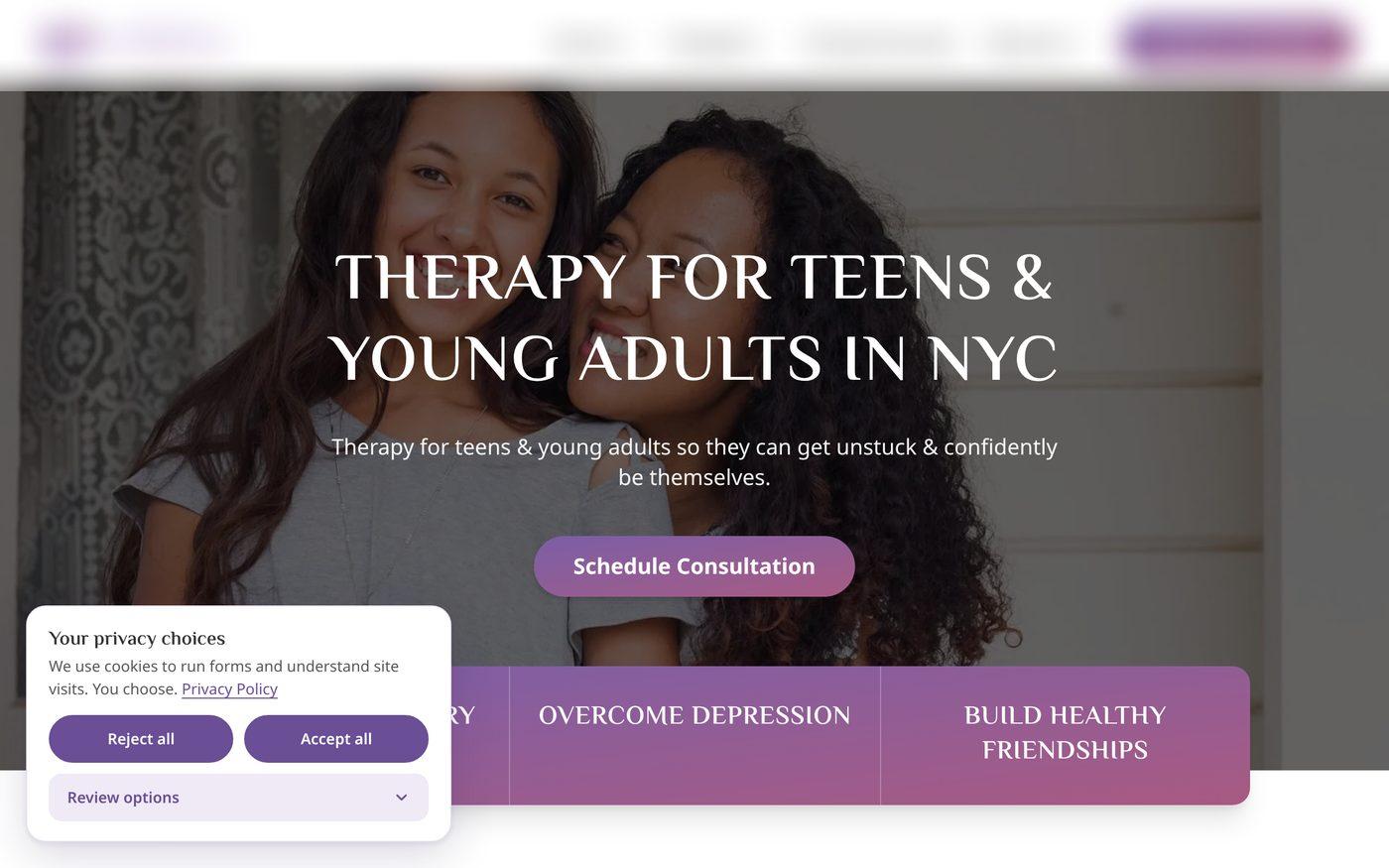
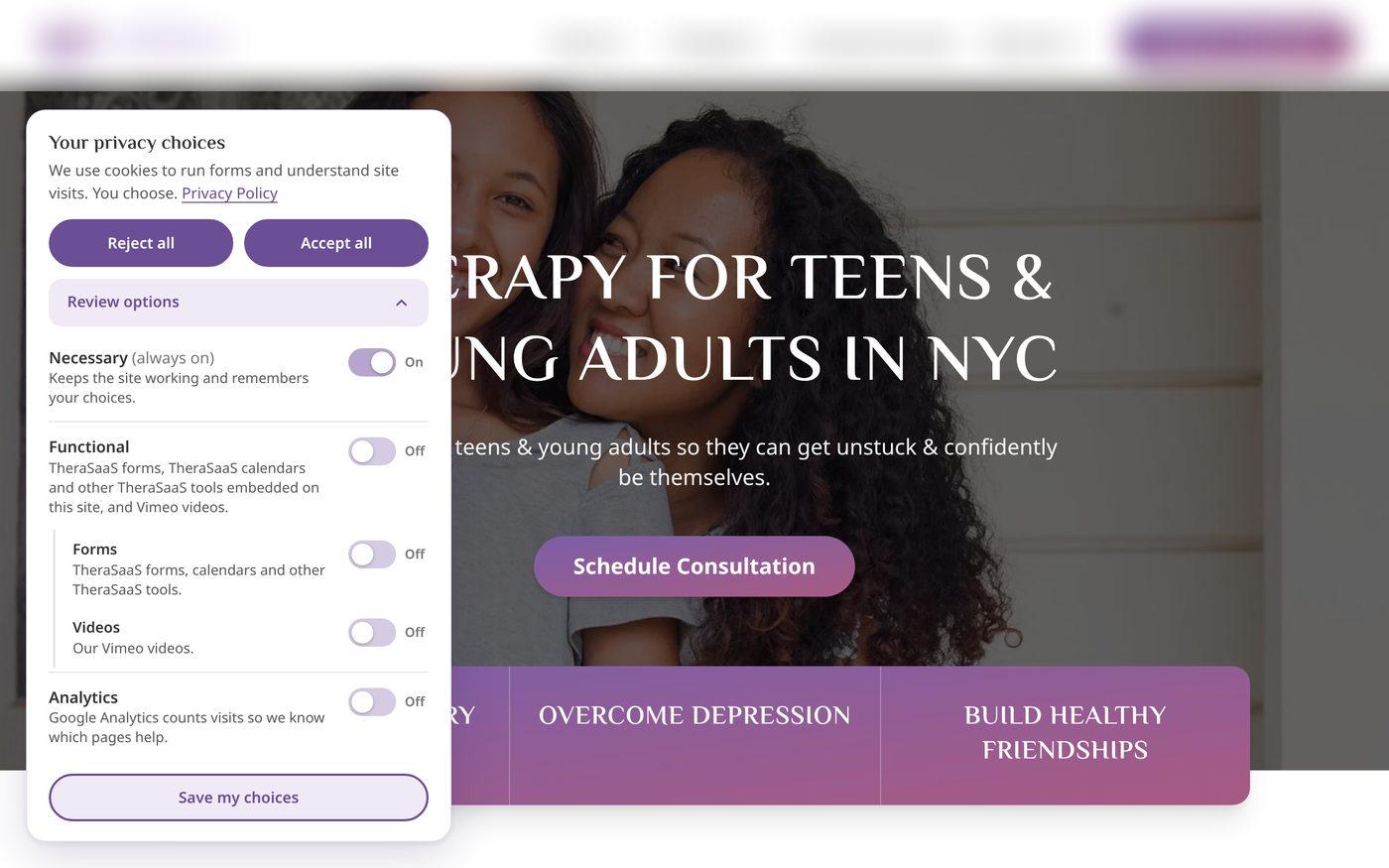
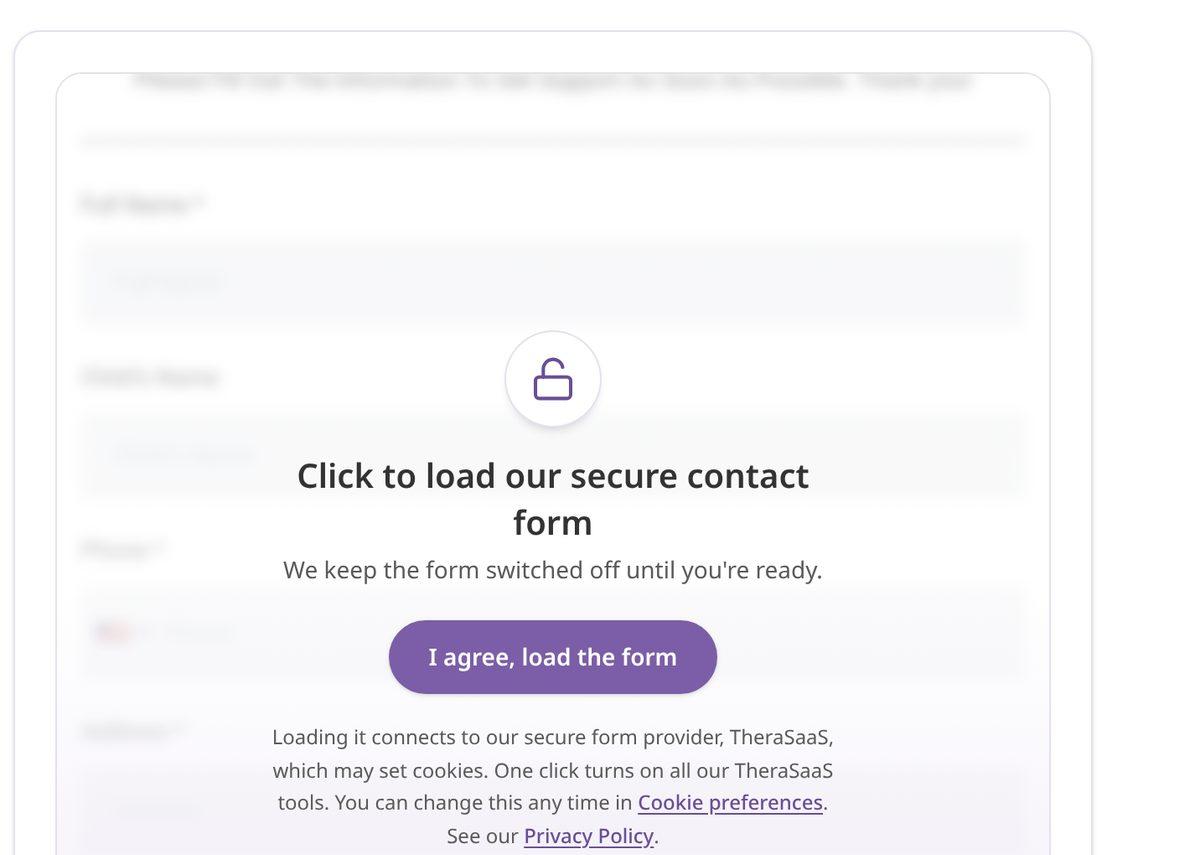
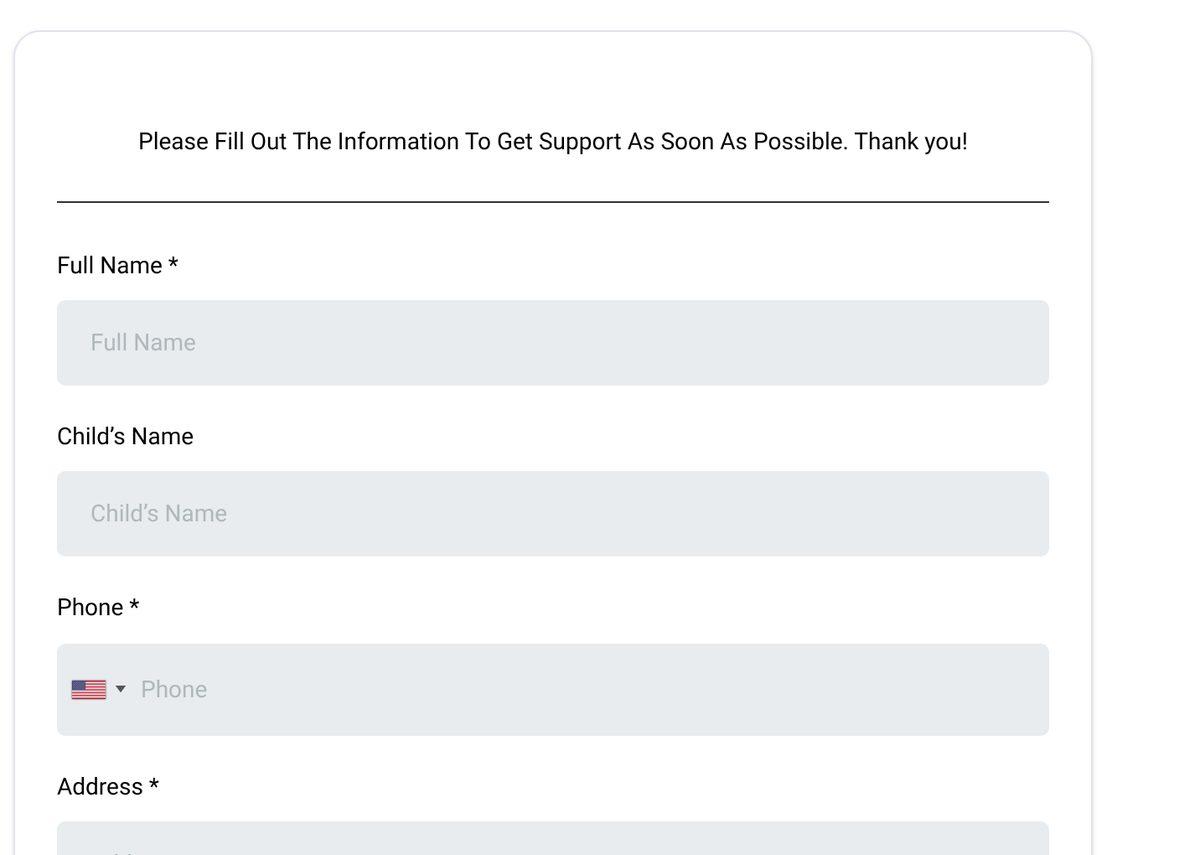
Here's what that looks like on a live practice website we built. Analytics stays off, and no form loads, until the visitor says yes.
1. The banner, before a visitor chooses
2. Review options
3. The form, before a yes
4. The form, after a yes
No website can guarantee you'll never receive a letter, and this isn't legal advice. It does mean less to point at, and proof of what you did.
Want a CRM plus a website with proper consent built in? Schedule a demo, and ask for a free website audit.
Schedule a Demo40 minutes, no free trial needed
Section 13 — Frequently Asked Questions
Website Tracking Lawsuit FAQ for Therapists
Is a demand letter the same as a lawsuit?
Should I pay to make it go away?
Does a cookie banner protect my practice?
Is Google Analytics illegal on a therapy website?
Why does the Meta Pixel come up so often?
Does HIPAA apply to my website?
Does California's new law (SB 690) stop these letters?
What should I ask my webmaster?
Will a TheraSaaS website prevent accusation letters?
Section 14 Sources
- Google: HIPAA and Google Analytics
- Google: User-provided data collection in GA4
- American Hospital Association v. Becerra, court order (June 20, 2024)
- HHS will not appeal (AHA News, Aug. 29, 2024)
- Rand v. Eyemart Express, Fifth Circuit opinion (Oct. 23, 2026)
- Rand v. Eyemart Express, law firm summary (Privacy World)
- Strong v. LifeStance Health Group, court order (D. Ariz., Jan. 2025)
- Massachusetts decisions deepen the split (Pierce Atwood, Oct. 28, 2026)
- 2025 review: web tracking and the Wiretap Act (WilmerHale)
- Javier v. Assurance IQ, Ninth Circuit memorandum (May 31, 2022)
- Goulart v. Cape Cod Healthcare, U.S. Chamber amicus brief (First Circuit)
- Popa v. Microsoft, Ninth Circuit opinion (Aug. 26, 2025)
- Doe v. Adventist Health System/West (Justia)
- SB 690, Governor's signing message (Sept. 30, 2026)
- SB 690, bill text (California Legislature)
- SB 690 signed into law (WilmerHale)
- Complianz on WordPress.org